Explore Circles Camera Messages Profile
Privacy Policy Terms & Conditions Age Contact
New Now on the App Store

Meet fomo.

Your people. Their moments. Nothing missed.

fomo no more.

fomo app on two iPhones
BUILT FOR YOUR PEOPLE

What makes fomo, fomo.

Five features designed around the way you actually connect.

EXPLORE

A feed built for your people.

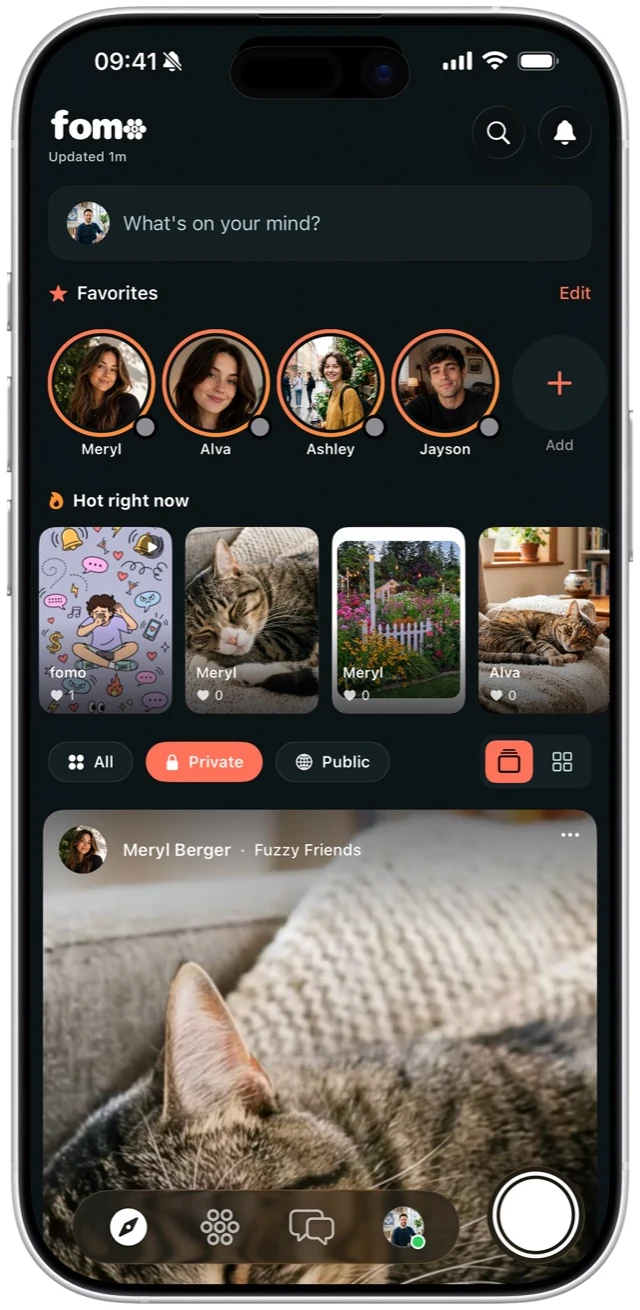
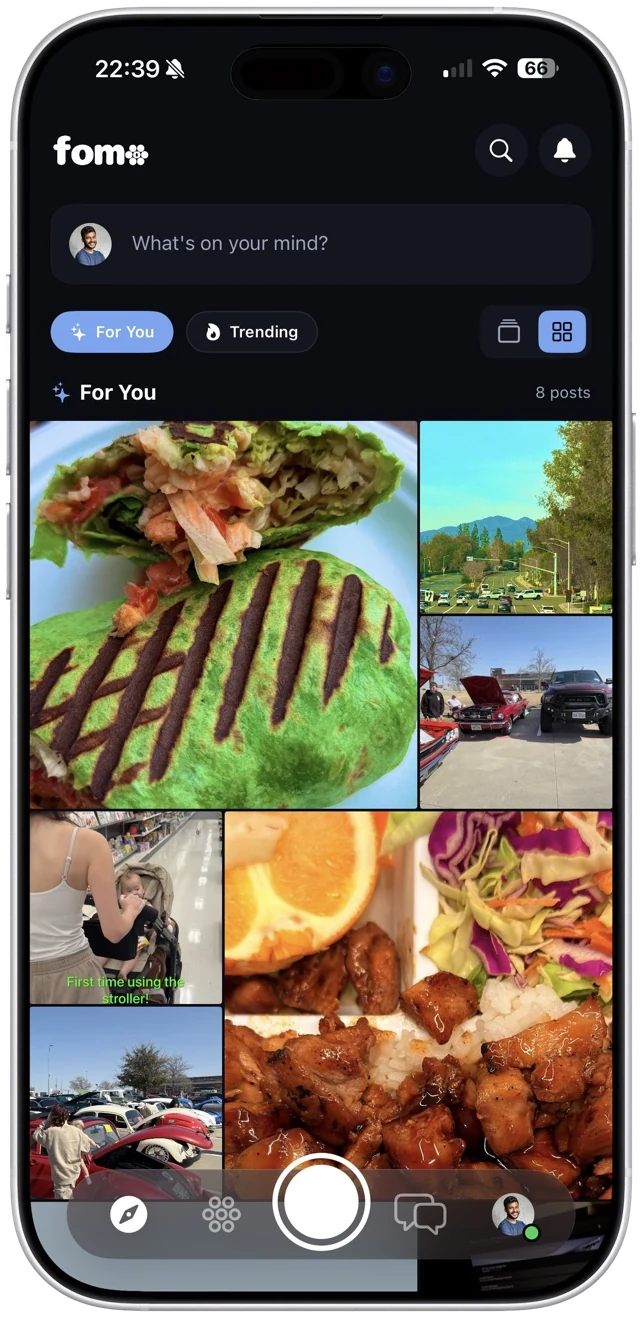
Your Explore feed is chronological — no algorithms decide what you see. It shows content only from circles you've joined, in real time.

Learn more
Explore feed
Navigation

CIRCLES

Private groups for every part of your life.

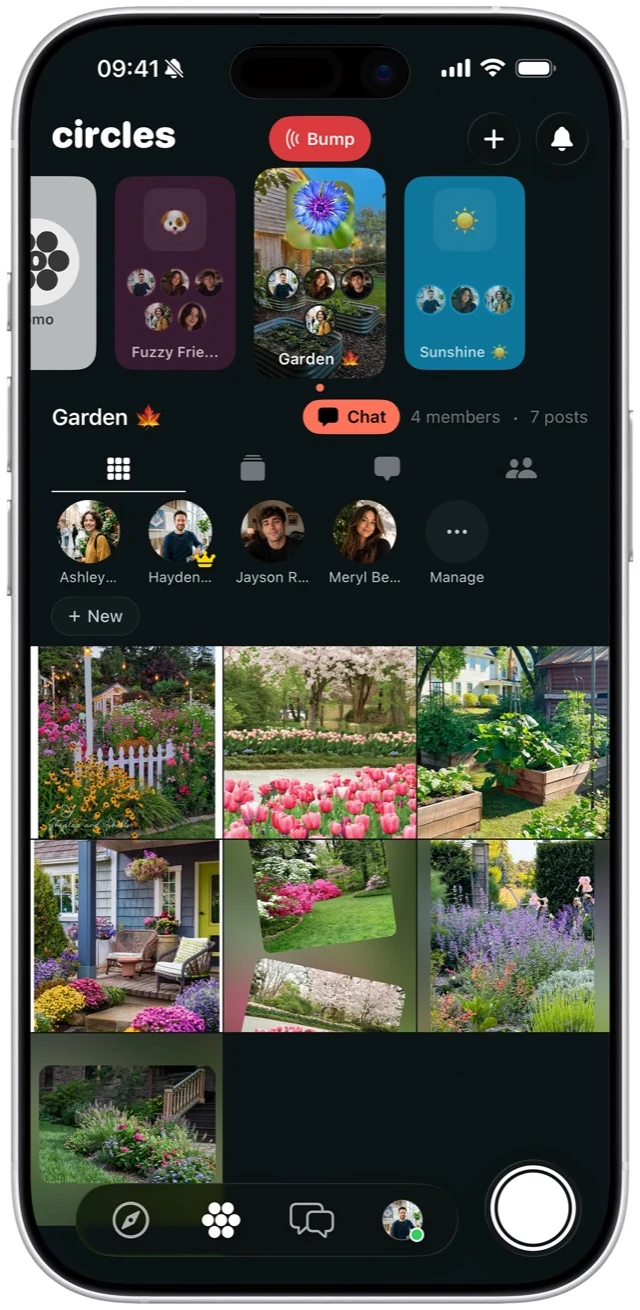
Family, friends, roommates — each circle is its own world with a dedicated feed, group chat, and shared photo grid.

Learn more
Circles view
Navigation

CAMERA

7 creative tools. Built in, not bolted on.

Filters, text, drawing, stickers, frames, picture-in-picture, and focus mode — all without leaving the app.

Learn more
Camera tools
Navigation

MESSAGES

Conversations that feel personal.

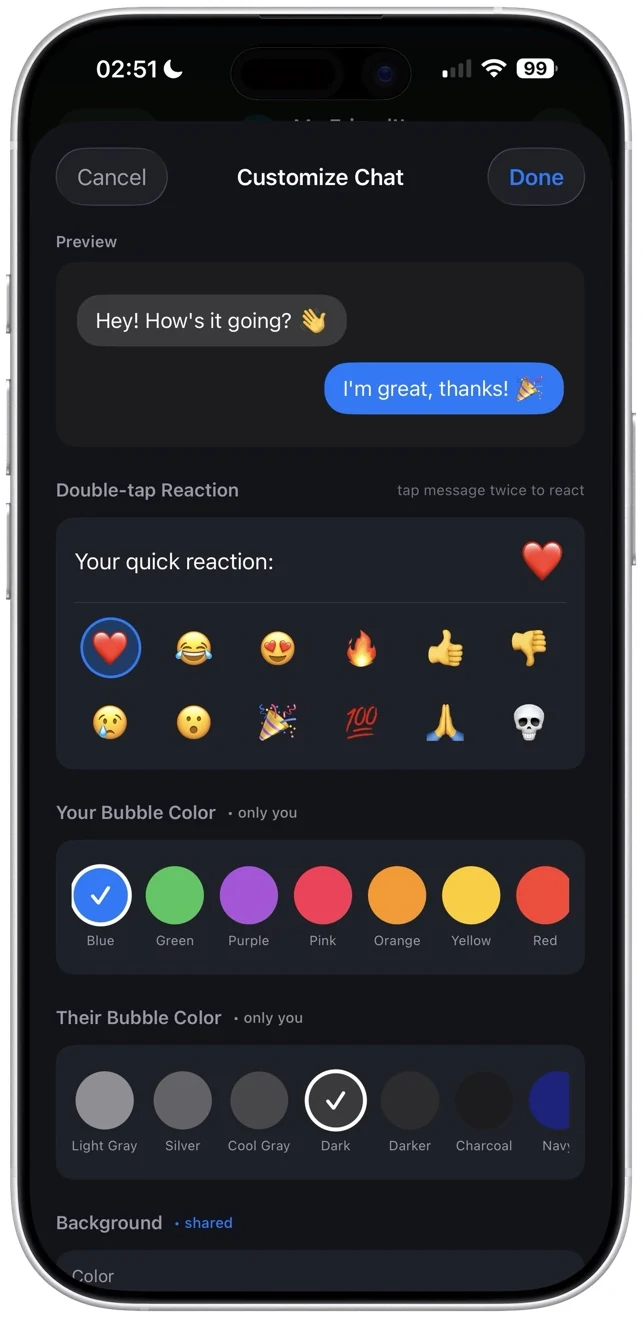
Custom bubble colors, chat backgrounds, double-tap reactions, read receipts, and real-time typing indicators.

Learn more
Chat detail
Navigation

PROFILE

85+ themes. Make every pixel yours.

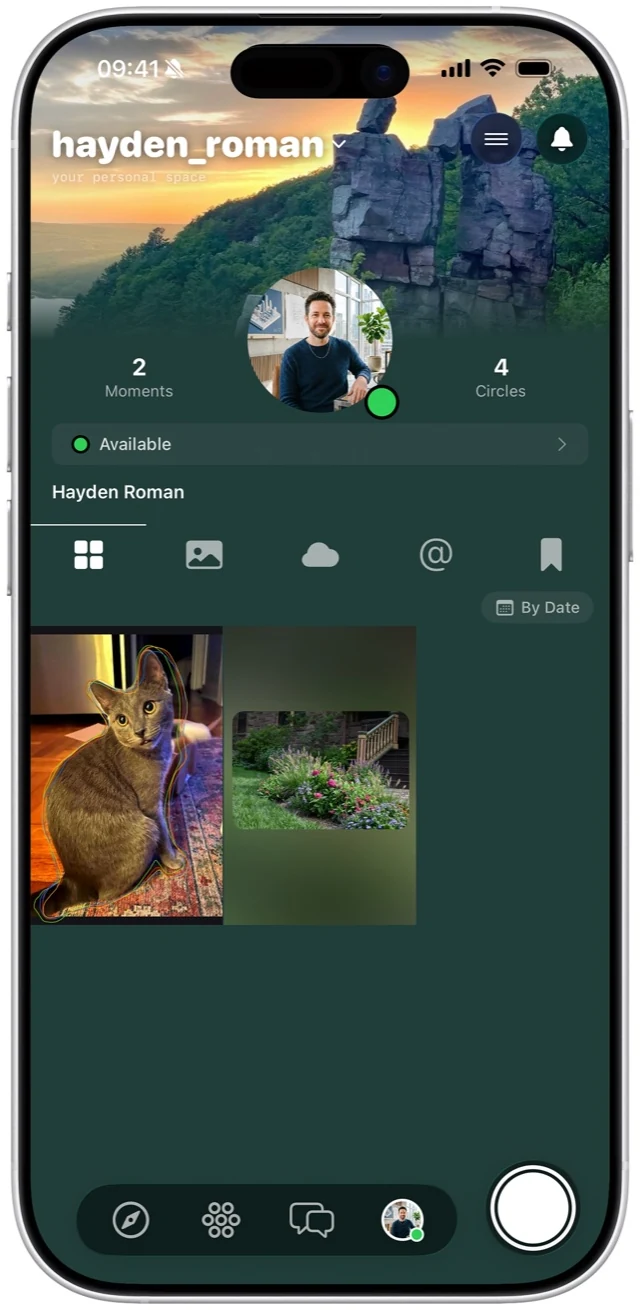
Custom banners, blur backgrounds, animated status, and circle badges. Choose from 85+ built-in themes or build your own.

Learn more
Profile customization
Navigation

Six ways to react.
Plus every emoji ever.

🔥❤️😊🤩😔🤬
Quick React

Tap once.
React instantly.

Tap the reaction bar below any post to instantly react with one of the six core emoji. Everyone in the circle sees it in real time.

Quick reactions
Long-Press for More

Every emoji.
Ever made.

Full emoji reactions

Long-press the reaction bar to open the full emoji keyboard. Pick from thousands of emoji — hearts, flags, animals, food, you name it.

Reaction insights
Reaction Analytics

See who reacted.
And with what.

See exactly who reacted with what. Your post analytics break down reactions by type so you know which emoji your photo earned.

Real-Time Updates

Watch emoji
roll in, live.

Reactions appear instantly for everyone in the circle. No refresh needed — watch the emoji count tick up as your people respond.

Live notifications

Every moment
from your people.
Nothing else.

Your Explore feed is chronological — no algorithms decide what you see. It shows content only from circles you've joined, in real time. No ads. No suggested posts. No strangers.

  • Photos & Carousels — single images or swipe-through sets up to 10
  • Videos with Music — full playback with song attribution
  • Thoughts — text-only posts for when you don't need a photo
  • Hot Right Now — trending posts ranked by engagement
fomo explore feed

Share single shots or swipe-through sets.

Post a single photo or bundle up to 10 into a carousel your circles can swipe through. Tap to tag people right on the image — even people who aren't on fomo yet.

Full playback. Full sound. Full vibes.

Record or upload videos with automatic music attribution from your library. Your circles see the song title and artist — so they can find the track that's stuck in their head.

Browse
Video post in explore feed
Tap
Video post unified detail view
Focus
Video post in focus mode
Browse Tap Focus

Say it without a photo.

Sometimes words are enough. Drop a Thought — a text-only post that lives in your feed just like photos and videos. Get emoji reactions and start conversations without needing a camera.

Thoughts feed on fomo
Close-up of a Thought post
Text post

See what's trending in your circles.

The Hot Right Now section surfaces the most-engaged posts from your circles. It ranks by reactions, comments, and saves — not an opaque algorithm. Every post is still from your people.

Hot Right Now on fomo
Trending
Post with comments and reactions

Real conversations.
Not just
likes.

Every post has a threaded comment section. Reply to specific comments to start side conversations. React to individual comments with emoji. See user avatars and timestamps on every reply.

  • Threaded replies — reply to specific comments
  • Comment reactions — react to any comment
  • User avatars — see who said what

Gone in 24 hours.

Ephemeral videos and photos for your circles. Record a moment, send it out, and watch it disappear. One view, one optional replay. Then it's gone forever. This isn't permanent. This is for right now.

1
View
Watch once, marked as seen
1
Replay
Use it wisely, then it's gone
24
Hour Expiry
Even unviewed Fliks vanish
2
Cameras
PiP mode captures both sides
Flik recording on fomo

See who's
paying
attention.

Every post comes with detailed analytics. See exactly how many people viewed your post, who reacted, who saved it, and who downloaded your photo — with your permission.

  • Impressions — how many times your post was seen
  • Reactions — breakdown by emoji type
  • Saves — who bookmarked your post
  • Downloads — who saved your photo (with permission)
Post analytics on fomo

Up and running
in 30 seconds.

No complicated setup. No friend requests. Just download, create, and share.

1

Create your account

Sign up with Google, Apple, email, or phone. You're in the app in seconds.

2

Start or join a Circle

Create a private circle for any group — your roommates, your gym crew, your family — and invite them with a simple code.

3

Share everything

Post photos, drop Thoughts, send Fliks, chat in real time. Every moment lives in the Circle where it belongs.

Stop missing out.

Join your people on fomo. Free on the App Store.

Download for iOS
Your Inner Circle

Built for your
closest people.

Circles are private groups that keep every conversation, photo, and moment between exactly the right people. No followers. No strangers. Just your people.

Circles view on fomo

Social, but
actually private.

Other apps

  • Public feeds visible to strangers
  • Algorithms decide what you see
  • Follower counts as social currency
  • Data sold to advertisers

fomo

  • Private circles for your people only
  • Chronological feed, no algorithm
  • No follower counts or public profiles
  • Your data stays on your device

Name your Circle.

Tap "New Circle" and give it a name that means something. Your family, your gym crew, your roommates — whatever the group, name it something only your people will get.

Create a Circle - name and icon selection

Make it yours.

Type in your circle name and hit Next. Something like "The Boys 💪" or "Family Group Chat" — whatever fits. This is the name everyone in the circle will see.

Create a Circle - step two

Pick an icon.

Customize your circle with an icon that represents the group. Choose from dozens of options — people, sports, food, travel, pets, and more. Add a profile photo if you want to make it extra personal.

Create a Circle - step three

Circle created.

That's it — you're done. Your Circle is live and ready to go. Share the invite code with your people, and as soon as they join, start posting photos, videos, Thoughts, and Fliks.

Circle created successfully

Every group
in one place.
Organized.

Your Circles screen shows every group you belong to at a glance. See member counts, unread posts, and the latest activity. Tap in to see the feed or jump straight to the group chat.

Circles list view

Hold to reveal
every option.

Long-press any Circle to instantly access quick actions — edit details, manage members, share the invite code, mute notifications, or leave the group. Everything you need, one touch away.

Circle options menu

Every moment
lives here.
Together.

Each Circle has its own dedicated feed — a chronological stream of photos, videos, and updates from your people. No algorithm decides what you see. Every post appears in order, exactly when it's shared.

Circle feed with post cards

Say what's
on your mind.
Privately.

Thoughts are text-only posts shared within your circles. Quick updates, inside jokes, random ideas — say it without needing a photo. Your circle sees it, nobody else.

Thoughts view in circles

See every post
you're in.
All in one place.

When someone tags you in a photo, video, or Thought, it shows up in your Tagged tab. Quickly browse every moment your friends wanted you to see — no scrolling through an entire feed.

Tagged posts view

Know who's
in your circle.
Always.

See every member at a glance with their online status, role (admin or member), and activity level. Admins can remove members, manage roles, and revoke invite codes to keep the circle tight.

Manage circle members

Got a code?
You're in.

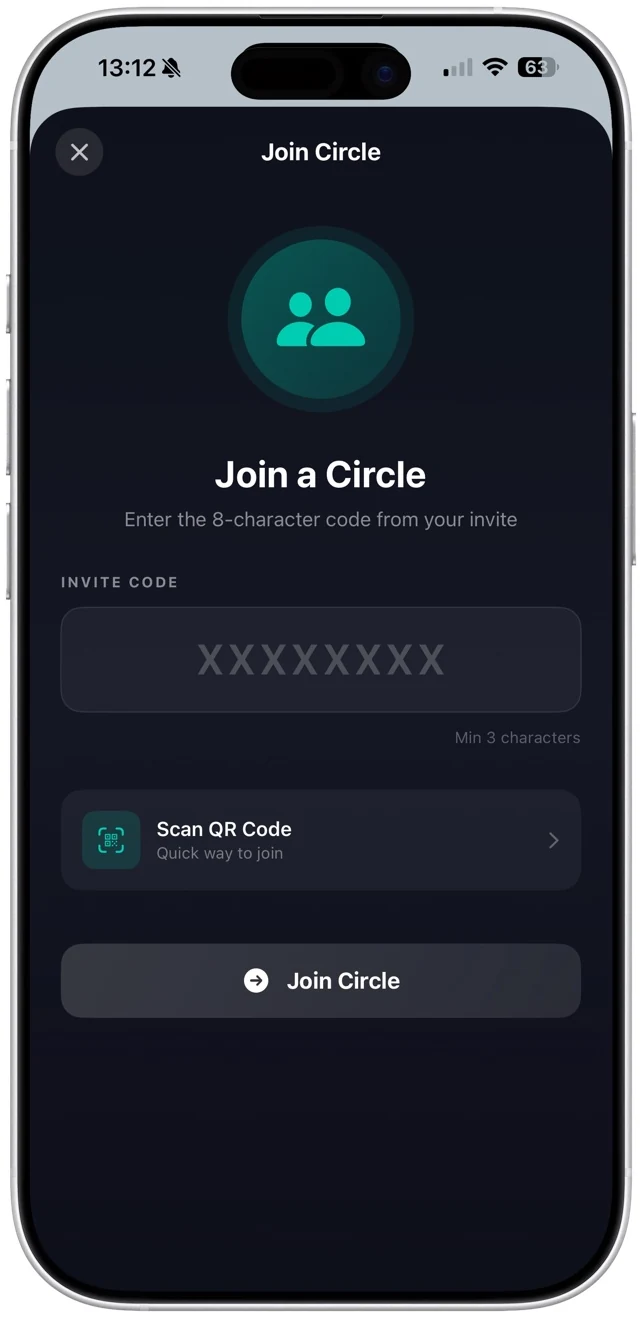
Joining a Circle is as easy as pasting an invite code. No friend requests, no waiting for approval. Enter the code, tap join, and you're instantly part of the group.

Join a circle with invite code

Make it
yours.

Set a custom background photo, upload a circle profile image, and choose an accent color that represents your group. Every Circle can have its own unique look and feel.

Custom circle background

Your data stays
yours.

Privacy isn't a setting — it's the architecture. Every photo, message, and moment is protected by design.

End-to-End Encrypted

Invite-Only Circles

Every Circle is private. No one gets in without an invite code from an existing member.

No Public Discovery

Your posts are never shown to strangers. No public explore page. No trending section for outsiders.

Download Controls

You decide who can save your photos. Track every download so you always know where your content goes.

Notification Controls

Mute individual circles, set custom notification preferences. Control exactly what gets your attention.

Zero-Knowledge Architecture

No tracking pixels. No data selling. No algorithms deciding what you see. Your content belongs to you and your circles — and nobody else.

Your circle is waiting.

Download fomo and start sharing moments that matter. Free on the App Store.

Download for iOS
Make every moment a masterpiece.
fomo camera editor
Camera editor tools
Focus
Text
Paintbrush
Add Photos
Frames
Filters
Crop & Canvas
On This Day

Swipe through tools in the app

Capture · Edit · Share

A full creative studio built into every capture. Shoot, edit, and share — without ever leaving the app.

0
Creative Tools
Unlimited
Filters
0
Photos per Carousel

The creative toolkit.

Every tool you need to make your photos stand out — all built right into the editor.

1
Editor

The full studio.
In your pocket.

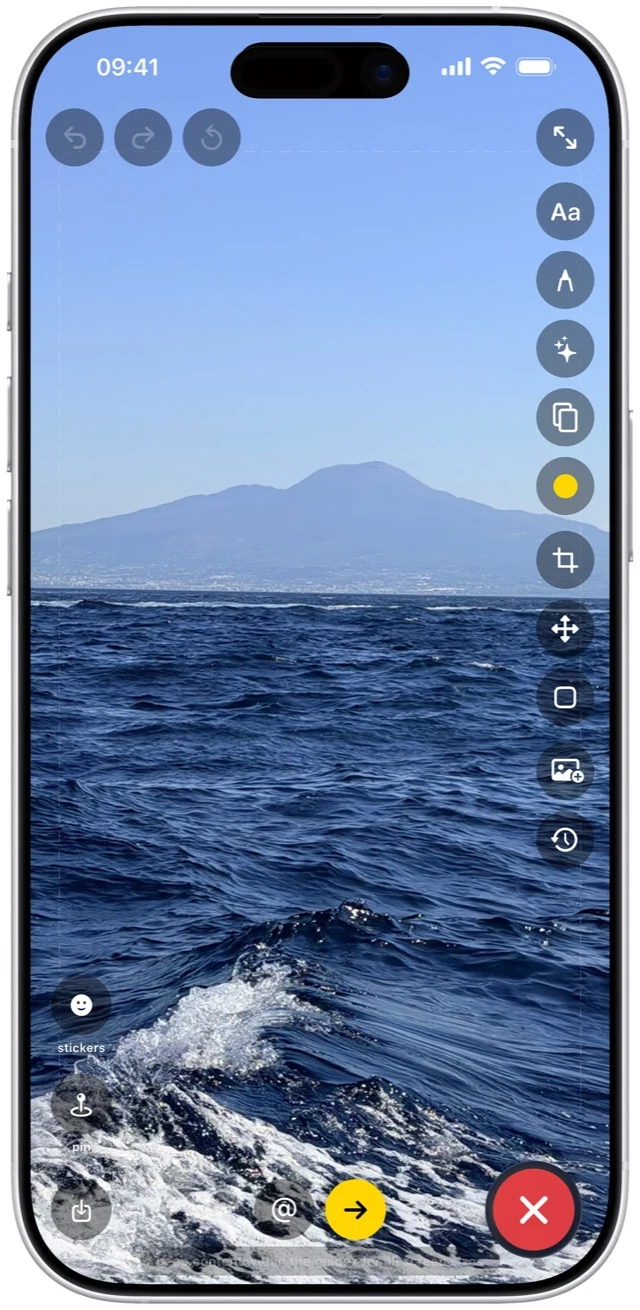
Open any photo and unlock the complete editing suite. Filters, text, drawing, stickers, frames, crop, and more — all accessible from a single toolbar.

Camera editor
2
Text

Say it with
words.

Add captions, titles, and overlays. Choose from multiple fonts, customize colors and sizes, and place your text exactly where it looks best.

Add text tool
3
Drawing

Freehand draw
with full control.

Pick a color, adjust the brush size, and draw directly on your photo. Circle something funny, draw an arrow, or add your own artistic touch.

Paintbrush drawing tool
4
Photos

Layer in more
from your library.

Pull in additional photos from your camera roll and layer them right onto your creation. Build collages, add context, or combine memories into one post.

Add photos from library
5
Frames

Frames that tell
the story.

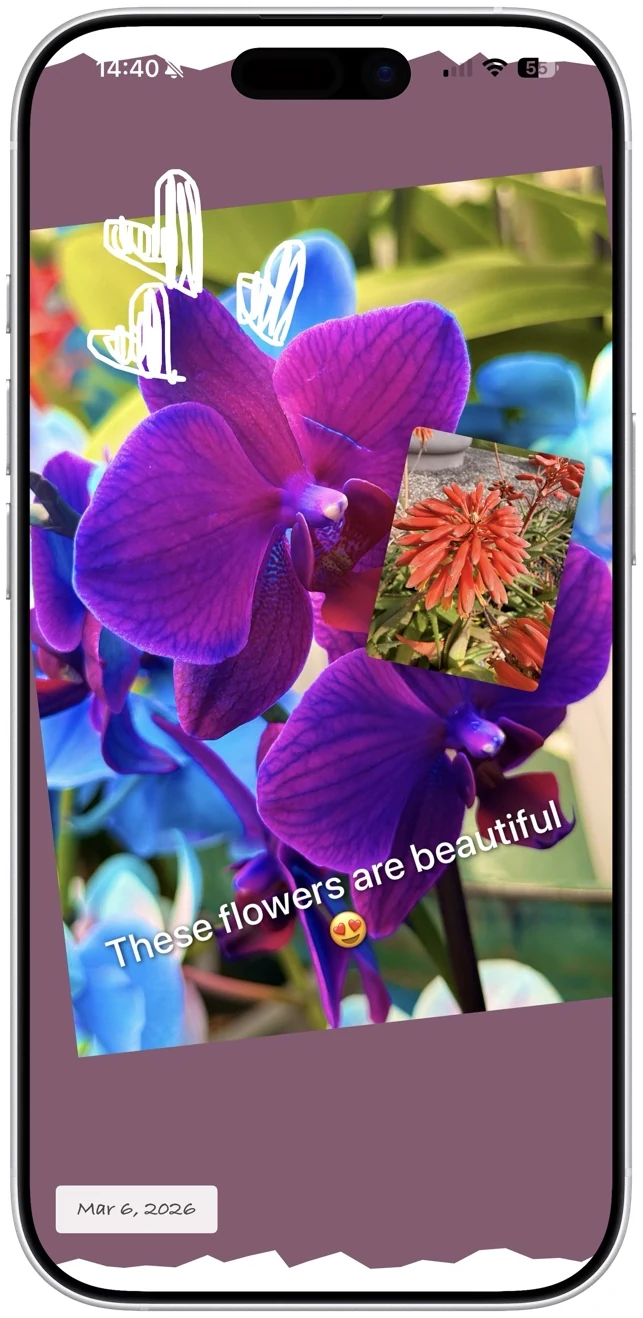
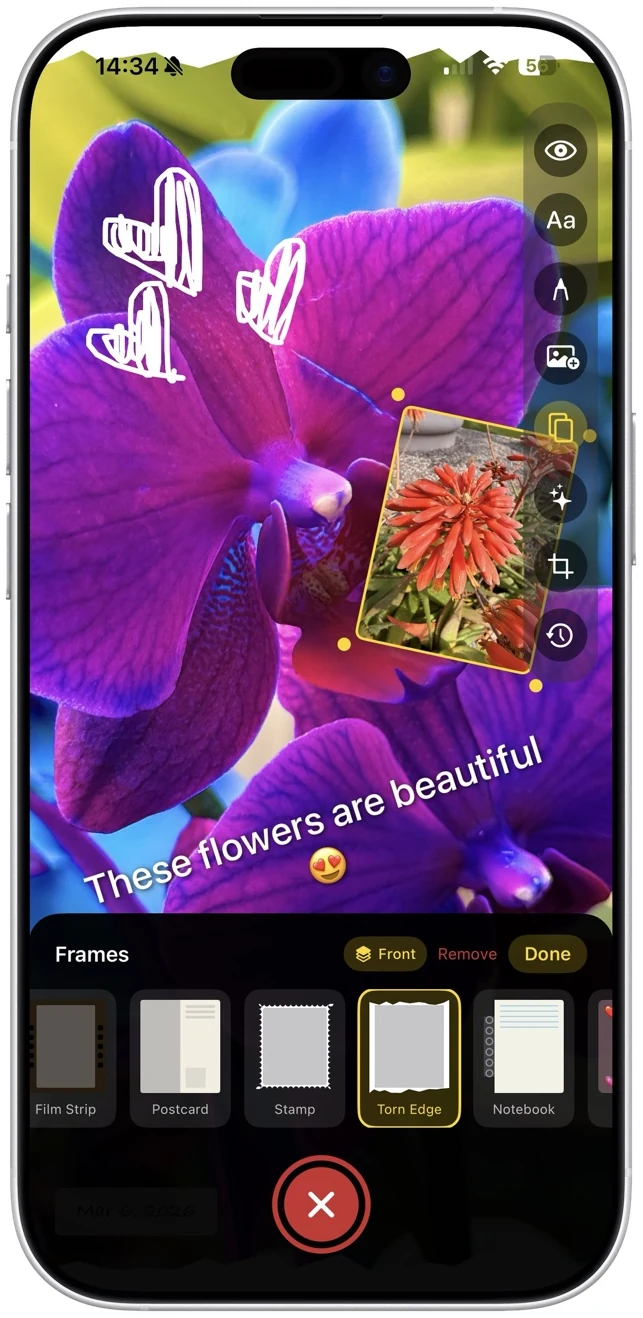
Add frames that show the date, time, and location of your photo. Choose from clean, modern, and vintage styles. It's like a timestamp for your memories.

Frame picker
6
Filters

Find the perfect
look.

Swipe through a curated collection of filters. Preview every one in real time — from subtle warmth to dramatic black-and-white. Filters apply to both photos and videos.

Filter selection
7
Crop & Canvas

Crop, resize, and
change the canvas.

Crop your photo to the perfect framing, or change the background color of the entire canvas. Make every detail intentional before you share.

Crop and background color

Even more built in.

Features that make fomo's camera unlike anything else.

Memories

On This Day

Resurface your favorite photos from exactly one year ago. A built-in nostalgia machine right inside the camera.

On This Day
Camera

Picture in Picture

Capture both cameras at once. Show the moment and your reaction side by side. Resize and reposition anywhere.

Picture in Picture mode
Video

Play music while recording.

Keep your playlist going while you capture video. The music plays through your speaker so it becomes part of the moment — no post-editing required.

Music playing during recording

Share it your way.

Review, configure, and publish — all in a few taps.

Post configuration

Review & Finalize

Add a caption, choose your circles, set download permissions, and save a copy to your photos — all before you post.

View your post

See It Live

Your post appears instantly in your circle's feed. See reactions, comments, and engagement as they happen.

Full screen photo view

Tap for Full Screen

Tap any photo to view it edge-to-edge in full resolution. Every detail, exactly as you intended.

Create something worth sharing.

The full creative suite is waiting. Free on the App Store.

Download for iOS
Real-Time Messaging

Chat that
feels alive.

Every circle gets its own conversation. Custom colors, reactions, backgrounds, shared posts — messaging built for people who actually care about their group chats.

Message chat list
Unlimited
Messages
0
Quick Reactions
0+
Bubble Colors
Conversations

Every message,
front and center.

Tap into any circle chat and see the full conversation. Photos, reactions, and replies — all inline. It feels like texting your closest friends, because it is.

Message detail view
Personalization

Make every chat yours.

Change bubble colors, pick themes, and customize every conversation to match the vibe. No two chats have to look the same.

Customize chat Customize chat colors
Sharing

Share posts
right in the chat.

See something great in your feed? Share it directly into any conversation. Posts preview inline so everyone can see it without leaving the chat.

Share posts in messages
Backgrounds

Set the scene
for every chat.

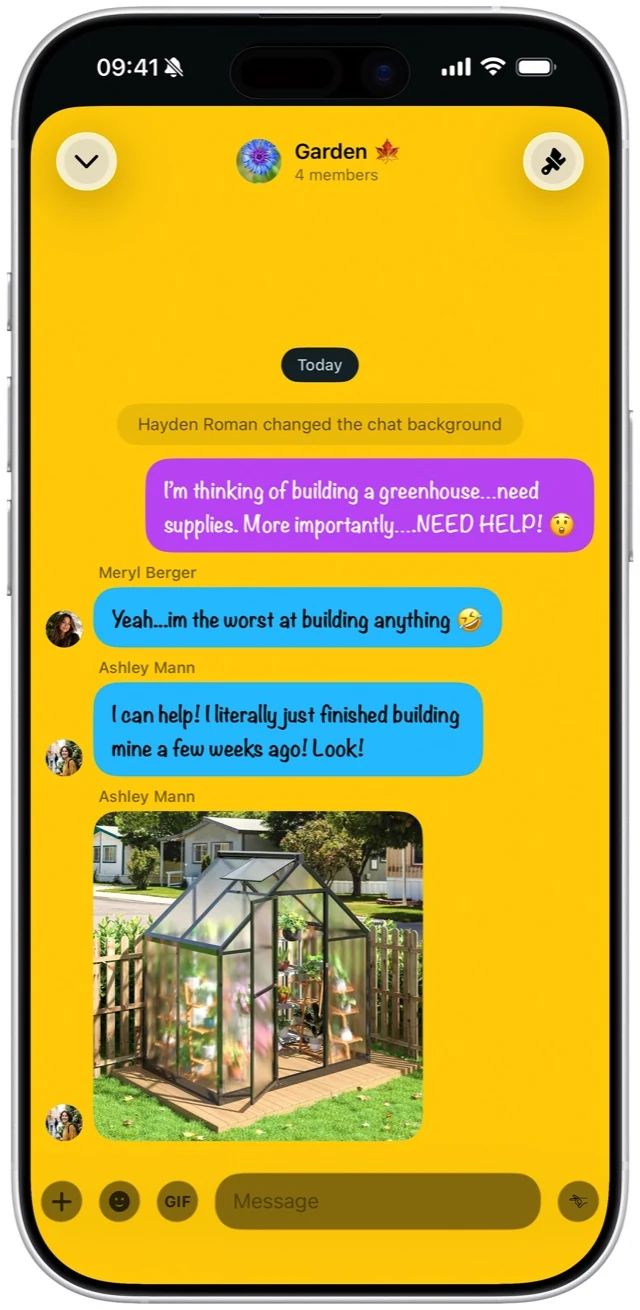
Pick a background that everyone in the circle sees. Solid colors, gradients, or photos — the whole chat transforms to match the mood.

Chat background customization

Chat that's built in,
not bolted on.

Real-time messaging in every circle. Free on the App Store.

Download for iOS
Personalization

This is
you.

85+ themes. Infinite customization. Your profile isn't a page — it's a canvas.

fomo profile page
85+
Built-In Themes
7
Theme Categories
100%
Customizable

Every tab tells
a story.

Your profile isn't just a page. It's four different windows into who you are.
1

Your life,
in postcards.

Every photo you post becomes a postcard on your profile. A scrollable, visual timeline of your best moments — laid out in a clean grid that lets your content speak for itself.

This is what people see first. Make it count.

Postcard view
2

Say what's on
your mind.

Thoughts are text-first posts. Hot takes, shower thoughts, late-night reflections — anything you want to say without needing a photo. They live in their own tab so nothing gets buried.

Your profile. Your voice. No character limit.

Thoughts view
3

See yourself
through others.

When friends tag you in their posts, those moments show up here. It's like a scrapbook you didn't have to make — built by the people who were there with you.

Every tag is a memory someone else thought was worth keeping.

Tagged view
4

Keep what
matters.

Saved is your private collection. Bookmark posts, moments, and ideas from anywhere in fomo. Nobody else can see this tab — it's your personal library of things worth revisiting.

Think of it as your favorites folder that actually stays organized.

Saved view
Status

Say it without
saying it.

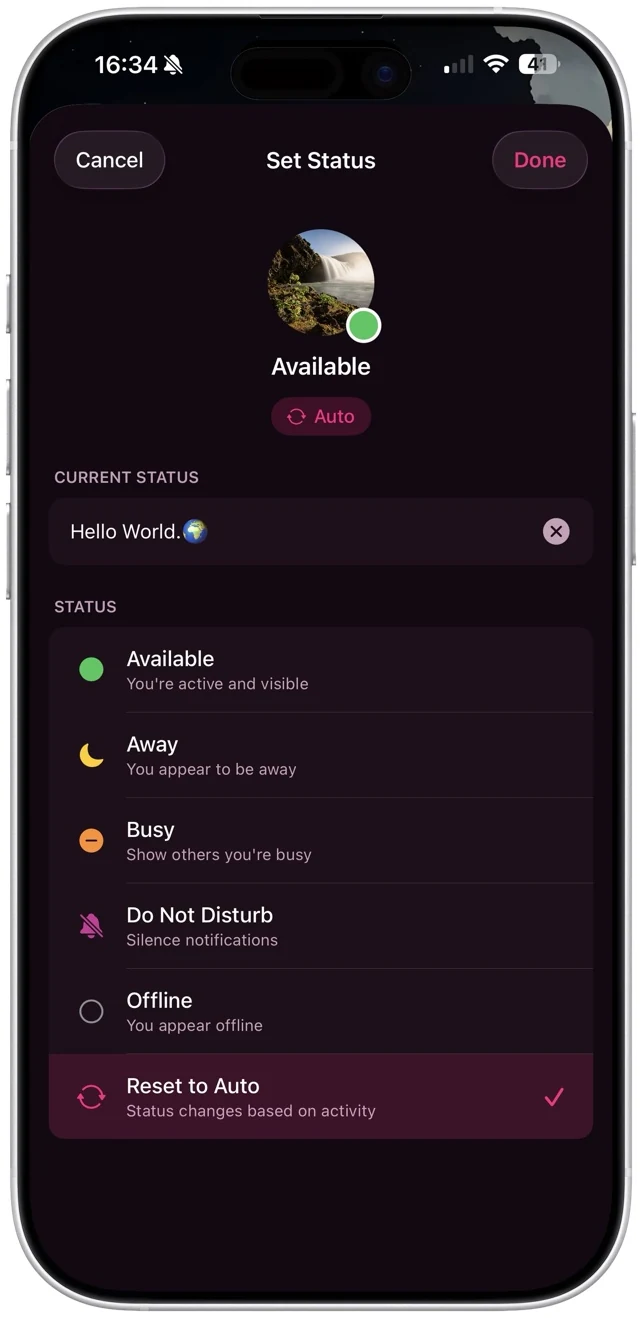
Set your status to Available, Away, Busy, or write a custom message. It shows everywhere — in chats, circles, and on your profile. A small signal that keeps your people in the loop.
Set status
Themes

One tap.
Whole new you.

Browse 85+ themes across 7 categories. Tap one and your entire profile transforms instantly — colors, gradients, textures, everything. Switch whenever the mood strikes.

Theme picker

85 themes.
Zero limits.

Make every pixel of fomo yours. Choose a theme, customize your profile, set your status, and own your space. Free on the App Store.

Download for iOS